

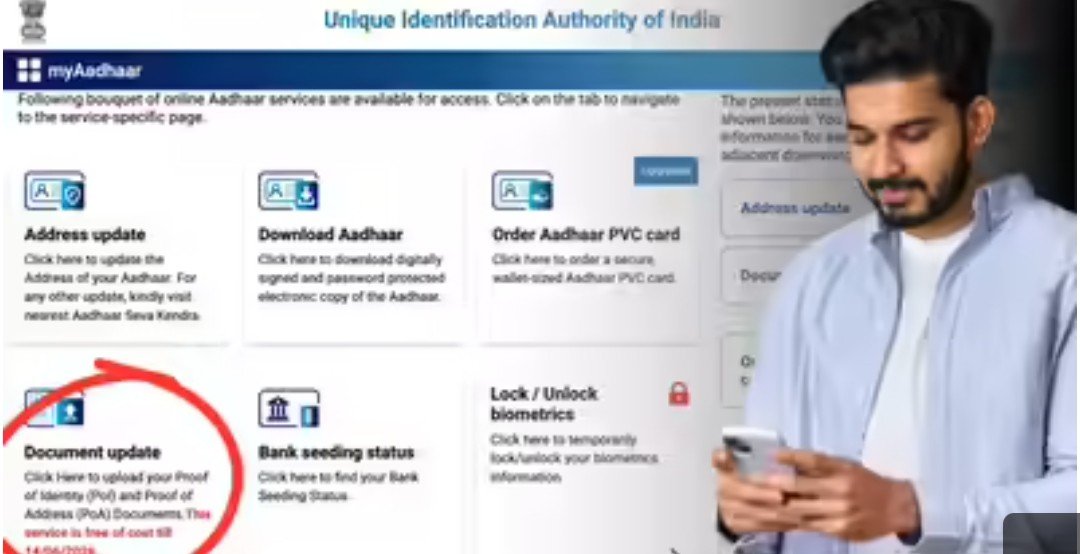
UIDAI Free Service Deadline: Is your Aadhaar 10 years old? If so, you should update it immediately. Failure to do so could delay many tasks. It’s worth noting that this work can be done for free until June 14th. However, there will be a fee for updating Aadhaar after that. UIDAI advises those whose cards were issued more than 10 years ago to update their identity and address proof in their Aadhaar card. This can be done for free on the UIDAI website until June 14th, following a few simple steps. You can easily do this using your phone or laptop.
It’s important to note that addresses and facial features can change over a decade. Therefore, keeping data accurate is crucial. Failure to update Aadhaar could lead to the suspension of government subsidies, problems with bank KYC, and other Aadhaar-related services. This is why updating your Aadhaar once every 10 years is considered essential, and a free service is available until June 14th.
According to UIDAI, it’s crucial that Aadhaar data is accurate. Ten years is a long period, during which changes in a person’s identity and address are possible. To avoid any problems matching your identity with Aadhaar and to avoid missing any important updates, UIDAI recommends updating your Aadhaar once every 10 years.
If your Aadhaar is 10 years old, you can update it for free before June 14th by visiting the official UIDAI website. To do this, you must:
Go to the official Aadhaar website, myaadhaar.uidai.gov.in, and log in to your account using your Aadhaar and OTP.
When the dashboard opens, click on the Document Update tab. If you look closely, you’ll see a red sign stating that this service is free until June 14th.
On the next page, you’ll see your current demographic information, such as name, gender, date of birth, and address. If everything is correct, tick the ‘I verify that the above details are correct’ checkbox.
Now, you’ll need to upload a Proof of Identity (POI) and Proof of Address (POA). First, select the document you’ll be uploading from the dropdown list, such as Voter ID, PAN card, ration card, etc.
Once the document is uploaded, click Submit. You won’t have to pay any fee as the service is free until June 14th.
Finally, note your Service Request Number (SRN). You can also use it to check your status.
When updating your Aadhaar, the copy or photo of the document you upload must be clear and clear, with no blurred information.
The name on the document you upload must match the name in your Aadhaar. If there’s a spelling discrepancy, it must be corrected first.
The size of the uploaded document should not exceed 2MB. Additionally, the portal only accepts files in JPEG, PNG, or PDF formats, so your document must be in these formats.